
Every shift counted.
Every kina right.
PNG payroll for security companies and shift-work businesses. Enter the fortnight's shifts and ShiftMaster works out overtime, public holidays, SWT and super, then gives you the payslips and the bank file.
No credit card. No setup fee. Set up in under an hour.
| Guard | 1 | 2 | 3 | 4 | 5 | 6 | 7 | 8 | 9 | 10 | 11 | 12 | 13 | 14 |
|---|---|---|---|---|---|---|---|---|---|---|---|---|---|---|
| J. Kaupa | 12 | 12 | 12 | – | – | 12 | 12 | 12 | 12 | – | 12 | 12 | – | 12 |
| M. Tobo | – | 12 | 12 | 12 | 12 | – | 12 | 12 | 12 | 12 | – | 12 | 12 | – |
| S. Anis | 8 | 8 | 8 | 8 | 8 | – | – | 8 | 8 | 8 | 8 | 8 | – | – |
What ShiftMaster does for you each fortnight
The parts of payroll that take hours in a spreadsheet, and go wrong when someone is tired.
Shifts, overtime and public holidays
14-day roster grid. 1.5x overtime and 2.0x Sundays and public holidays worked out for you. Import clock-in logs from your biometric machine.
PNG tax, done properly
IRC salary and wages tax tables with dependant rebates, and your monthly IRC Form SWT10 return ready to file.
Superannuation on time
6% employee and 8.4% employer contributions, with remittance schedules for NASFUND and Nambawan Super.
Bank file in one click
Direct-credit upload file for BSP, Kina Bank and ANZ, with branch BSB codes built in. Cash-paid staff handled separately.
The whole employee record
Staff loans with repayments, union and welfare deductions, leave, and final pay when someone finishes.
Payslips on every phone
Staff log in with their employee ID and PIN to see payslips, tax and super. Fewer calls to the office on pay day.
See ShiftMaster at work
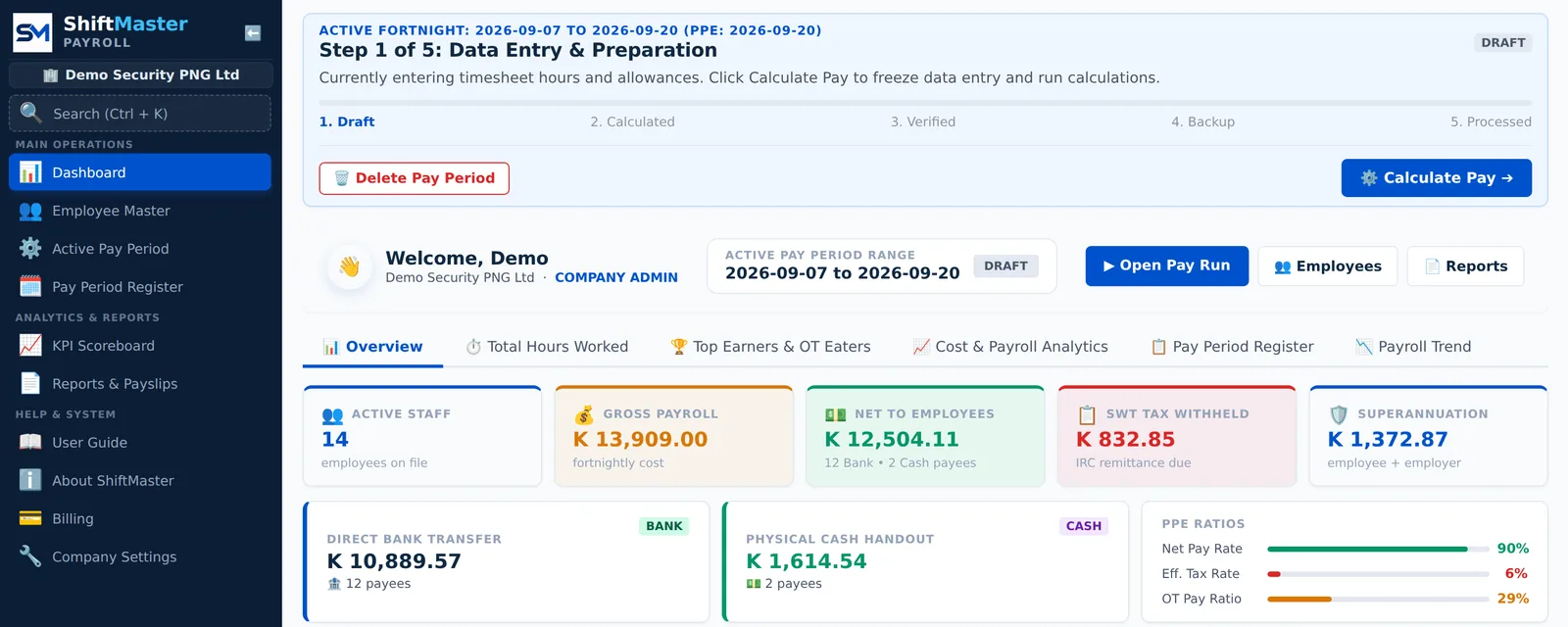
Real screens from the app, shown with a demo security company.
Enter the fortnight's shifts
One row per guard, one column per day. Type the hours or upload a CSV from your clock-in machine, and ShiftMaster splits normal hours from overtime and estimates each person's pay as you go.

Payslips your staff understand
Every payslip shows hours, overtime, allowances, SWT, super and year-to-date totals.
- Print in batches or export to Word
- Email payslips, or let staff see them on their phones

Your SWT return, ready to file
ShiftMaster applies the IRC salary and wages tax tables to every employee and totals what you owe for the period.
- Monthly IRC Form SWT10
- NASFUND and Nambawan Super schedules

One file to pay everyone
Download the bank upload file and load it into BSP, Kina Bank or ANZ online banking. Cash-paid staff are left out automatically and listed on a separate cash sheet.

All names, account numbers and figures in these screens belong to a made-up demo company.
From sign-up to first pay run
Set up your company
Add your IRC TIN, super fund and pay rules. Choose fortnightly or monthly pay.
Load your staff
Fill in our CSV template and upload, or add staff one by one. Moving from MYOB, Attaché or spreadsheets? We bring your history across.
Run a test pay
Enter a fortnight's hours and check the payslips, SWT and bank file against what you paid last time.
Built for businesses that run on shifts
Security companies
ShiftMaster started with guard rosters, where 12-hour shifts, nights and public holidays make payroll hard to get right.
- Rosters for every site and guard, fortnight by fortnight
- Overtime and public-holiday rates applied without formulas
- Clock-in logs imported straight from biometric terminals
- Bank and cash pay in the same run
- Logistics and transportDrivers, loaders and long shifts
- Hospitality and tourismHotels, restaurants and weekend rates
- Retail and wholesaleStores, warehouses and casual staff
- Construction, agriculture, healthSite crews, plantations and clinics
- Accountants and bookkeepersJournal files ready for MYOB, Xero, QuickBooks, Pronto or SAP
Simple monthly pricing
A monthly plan fee plus a rate for each employee paid. No setup fee, no contract.
Standard
For businesses with up to 50 staff.
- Plan feeK100 / month
- Per employeeK5 / month
- Up to 50 employees
- 14-day roster and timesheet grid
- PNG SWT, SWT10 return and super schedules
- Payslips and staff self-service
- BSP, Kina Bank and ANZ bank files
- CSV staff and timesheet import
Premium
Unlimited staff, custom pay rules and accounting exports.
- Plan feeK200 / month
- Employees 1–50K5 each
- Employees 51–100K4 each
- Employees 101 and upK3.50 each
- Everything in Standard, plus:
- Unlimited employees
- Biometric clock-in log import
- Custom overtime and shift-allowance rules
- Automatic staff loan repayments
- GL journal export for MYOB, Xero, QuickBooks, Pronto, SAP
- Payroll analytics and KPI scoreboard
Per-employee rates apply to employees paid in the month. Premium rates are tiered: the first 50 employees at K5, the next 50 at K4, and every employee after that at K3.50. Prices are in Papua New Guinea kina and exclude GST.
Start 2027 on ShiftMaster. January is free.
PNG's tax year starts on 1 January. Switch now and your whole 2027 SWT and super record lives in one system from the first pay.
Start your free trial- Try ShiftMaster free for 30 days
- Activate a plan by 15 December 2026
- We import your payroll history and set you up, free
- Run December in parallel, go live in January, and pay nothing for January
Questions
What happens when my free trial ends?
Choose Standard or Premium from inside the app and we send you an invoice. Everything you set up in the trial stays as it is. If you don't activate, your data is kept for 30 days so you can come back.
How long is the free trial?
During our October 2026 launch, every company that signs up gets 30 days free, with every Premium feature and no setup fee. Sign up by 31 October to get the launch trial. From 1 November, new trials are 14 days.
Do I get every feature during the trial?
Yes. Trials include all Premium features, so you can test biometric imports and accounting exports before you choose a plan.
How do I pay?
By bank transfer against a monthly invoice in kina. No credit card is needed for the trial or the subscription.
Is my staff data safe?
Each user has their own login and role, so clerks see only what they need. Every change is recorded in an audit log, and you can back up your company data at any time.
What if IRC changes the tax rates?
We update the tax tables in ShiftMaster for every customer. You don't need to change anything.
We use MYOB or spreadsheets now. Is moving hard?
No. We import your payroll history from your old system so year-to-date figures carry across, and help you set up. Most companies run one pay in parallel before switching.
Our internet is unreliable. Will that be a problem?
ShiftMaster runs in any web browser on a laptop or phone. You can fill in timesheets in the CSV template offline and upload them when you're connected.
Run your next pay on ShiftMaster.
Free for 30 days. No credit card, no setup fee.